

Why Business Central Rolling Forecasts Live in Excel


By the second month of the fiscal year, the annual budget already describes a business that no longer exists. Customer wins land ahead of plan, hiring slips a quarter, a vendor renegotiates its price, and the budget version sitting in Microsoft Dynamics 365 Business Central reflects none of it. Updating that version through the UI period by period is the kind of work nobody volunteers for. Business Central rolling forecasts are the answer most finance teams want: a forward-looking number refreshed every month so the gap between budget and reality stays small. The catch is that BC’s budget module was not designed for them.
Why annual budgets go stale by Q2
The annual budgeting exercise produces a snapshot of what the business expected three months before the year started. By the time Q1 closes, parts of that snapshot are already obsolete because customer timing has shifted, hiring has accelerated or slipped, and input costs have re-priced against the assumptions baked into the original model.
Most teams accept the gap and work around it. Variance reports show the difference between actual and budget every month, the CFO writes commentary about it, and nobody updates the budget itself, because doing so means re-entering months of forward-looking data inside BC’s matrix one cell at a time, one dimension at a time. The comparison gets less useful each month, and by August the budget is essentially a historical document.
A rolling forecast is the alternative pattern. Twelve months of forward visibility refreshed every month, with the most recent closed month dropping off the front and a new month added to the back. The forecast stays current. Variance reports keep their meaning. Hiring and spending decisions get made against a number that reflects what the business looks like this week.
What BC’s budget module was built for
Microsoft’s documentation describes the shape of G/L budgets in Business Central. Budgets most often cover a fiscal year, though BC does not require it; a budget can run any period, longer or shorter, with up to four dimensions and as many versions as the team wants to keep. The flexibility exists on paper, but managing a non-standard period without a live connection means every off-cycle adjustment gets entered through the same matrix UI that already makes the standard cycle painful. Amounts are added one cell at a time, each click opens the G/L Budget Entries page where the value is recorded as a debit or credit against a posting account, heading accounts get blanked on import, and only Posting account type lines can be brought back in from Excel.
That is a serviceable design for a once-a-year planning cycle and the wrong shape for a workflow that has to repeat every month. The Microsoft Learn page on G/L budgets even hints at the limit: its guidance on regular updates says you can “copy any of the budgets and turn them into forecasts.” That is the entire built-in answer to rolling forecasts.
Why Business Central rolling forecasts require a monthly refresh
For a rolling forecast to do useful work, three things have to be true. First, closed-period actuals need to flow into the model cleanly so the model stays tied to the ledger. Second, forward periods need to be easy to adjust based on what is known now, including closed deals, hiring decisions, signed contracts, and repriced inputs. Third, the updated forecast has to land somewhere the rest of the finance stack can use, so variance reports, board packages, and dashboards still tie out to a real budget version.
BC handles the third requirement once data is in. The first two break inside BC. Refreshing actuals into a budget version requires either an Excel export-edit-import cycle (where dimensional alignment and period filters have to be reset every time, and heading lines have to be stripped) or hundreds of manual cell edits in the matrix. Either path eats hours every month. After the second or third cycle, the rolling forecast stops being rolling.
The pattern is familiar to anyone who has tried to keep an Excel forecast model tied to live Business Central balances. The model itself is not the hardest part. Keeping its starting point aligned with the ledger as the months progress is where most teams lose the thread.
A worked example: Business Central rolling forecasts in Excel
Take a $40M services company running a monthly close on BC. The controller maintains a 12-month rolling forecast in a single Excel workbook. Actuals come from BC through live functions: revenue by service line, COGS, Opex by department, all filtered by the appropriate dimensions. Forward periods are formula-driven, with a base run rate from the trailing three months plus or minus known adjustments captured on a separate driver sheet.
On the first business day after close, actuals refresh. The newly closed month locks in. The driver sheet gets reviewed: is the new hire still starting in May, did the renewal close, has the cost of the new platform been finalized? Forward periods recalculate. The controller spends an hour reviewing the result, makes the judgment calls the formulas cannot, and then pushes the updated 12 months back into BC as a new budget version.
The whole cycle takes most of a morning, once. Variance reports the next day reflect the new forecast. Department heads see expectations that match what was discussed in last week’s leadership meeting, not what someone wrote down in October. The model that the controller iterates against sits in Excel, where iteration is fast. The version of record that downstream reports pull from sits in BC, where it belongs.
Where writeback closes the loop
The reason this works is that the workbook and the BC budget never get more than a month out of sync. Velixo’s Budget Writeback is the piece that holds the two together. Live BC data refreshes into the workbook on every open. The forecast model recalculates against current actuals. When the controller is ready, the writeback pushes the updated forecast back into a BC budget version, with dimension validation and user permissions enforced exactly the way they are for native entry. BC stays the system of record. Excel is the place the model gets built.
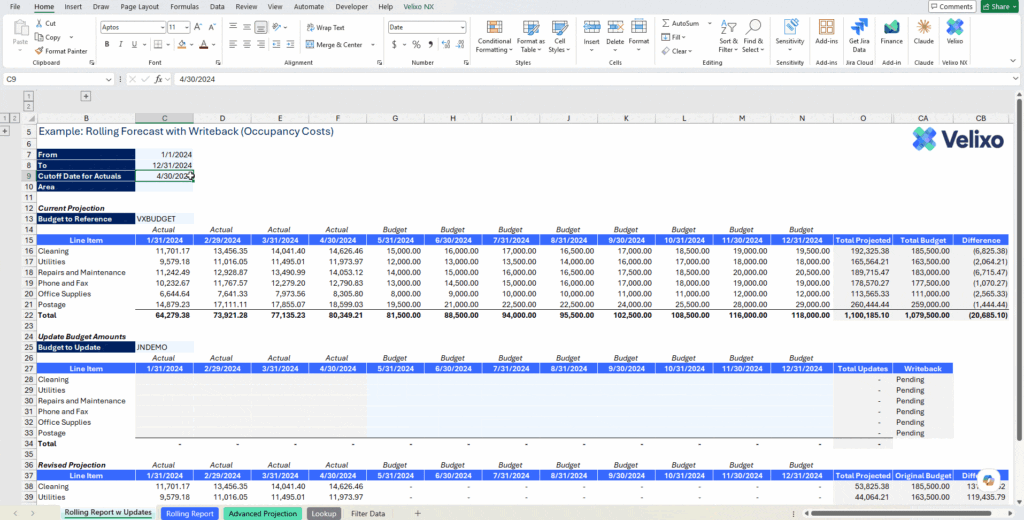
Roll a projection forward and write back a new forecast, all from within the same working file.
A previous BC budgeting piece on this blog laid out why the export-import workflow runs out of room as planning gets more dimensional and iterative. Rolling forecasts are the version of that problem where the iteration never stops.
Partners scoping a BC implementation should raise this in discovery. Clients who plan to manage with rolling forecasts will hit the wall described above inside their first fiscal year on BC. Building the Excel-and-writeback workflow into the reporting plan from go-live saves them the discovery process most teams go through after their first attempt to update a budget through the matrix.
Velixo connects Excel to Business Central, pulls live G/L actuals into formula-driven forecast models filtered by date, dimension, and account, and pushes the resulting budget versions back into BC through the BC.WRITEBACKBUDGET function. The forecast stays current because the workflow does. Learn more about Velixo for Business Central.