




Velixo Intelligence is your AI agent for ERP reporting in Excel
One prompt box. The right agent answers.
You type the question. Velixo Intelligence leverages the right skills for the task: Guide for product and ERP questions, Analyst for what’s in your sheet, Report Builder for new formulas and full reports. You don’t pick. You ask.
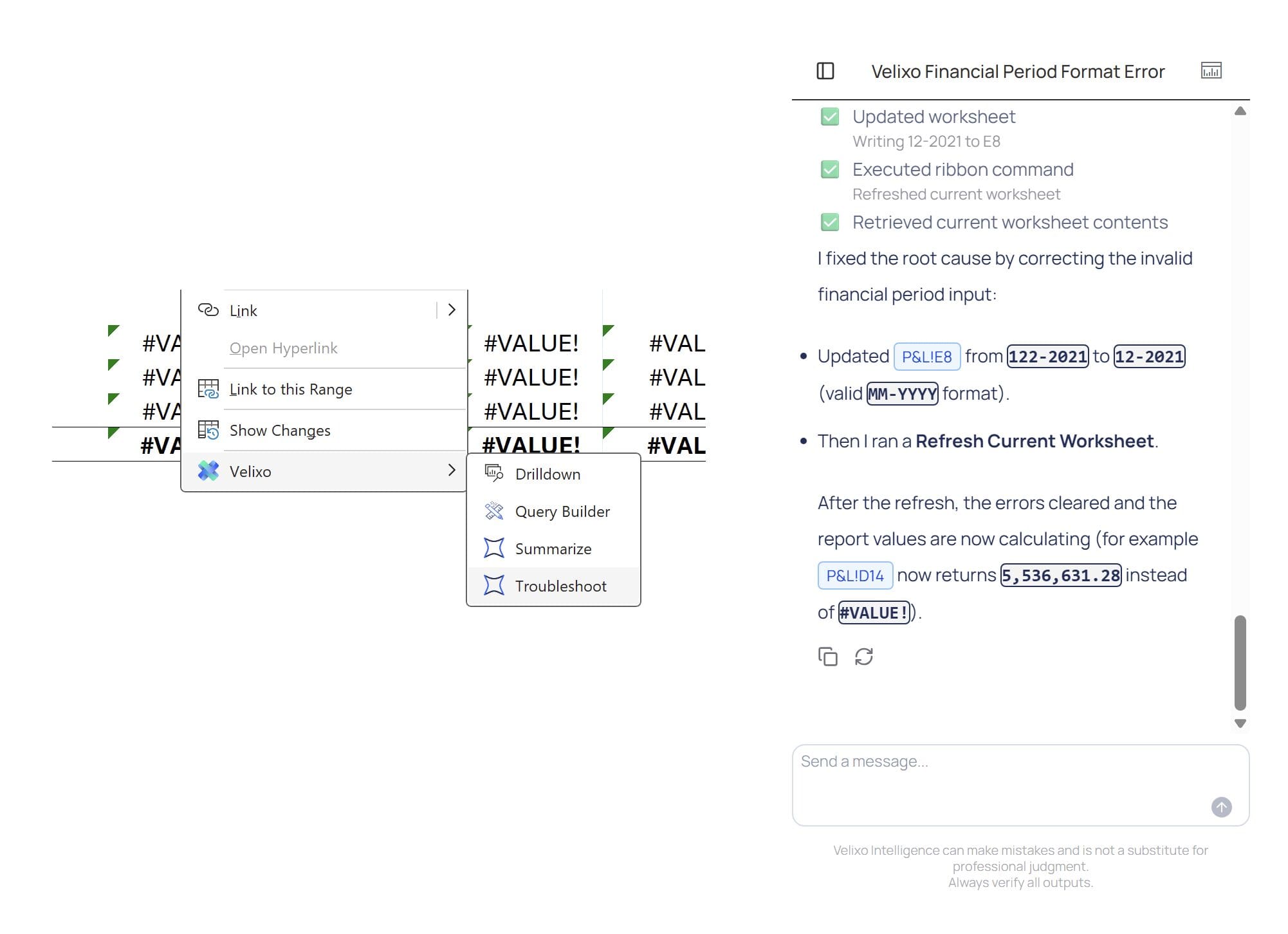
Stuck on a formula? Ask.
Type the question. Get the answer with the source — the function, the argument, the doc page, the GL field — in the side panel next to your sheet.
- Why is =ACCOUNTENDINGBALANCE(“4000-100”, TODAY()) returning #VALUE!?
- How do I pull AR invoices aged 60+ days, by customer, for the East region?
- What does the Branch argument do in this query, and why does my filter return zero rows?
Need the fix applied, not just explained? Velixo Intelligence can edit the formula for you. You approve. It writes.
Watch a short demo:
Powered by the Guide skill.

What happened this month? Ask.
Highlight any range. Ask what’s in it. The Analyst reads your sheet — your headers, your formulas, your dimensions — and answers grounded in the actual values, with the cells it used cited in the response.
The answer lands in the side panel, in a cell, or as a formula written to the sheet — your call. No data leaves Excel. No screenshots, no copy-paste into a chatbot.
Powered by the Analyst skill.
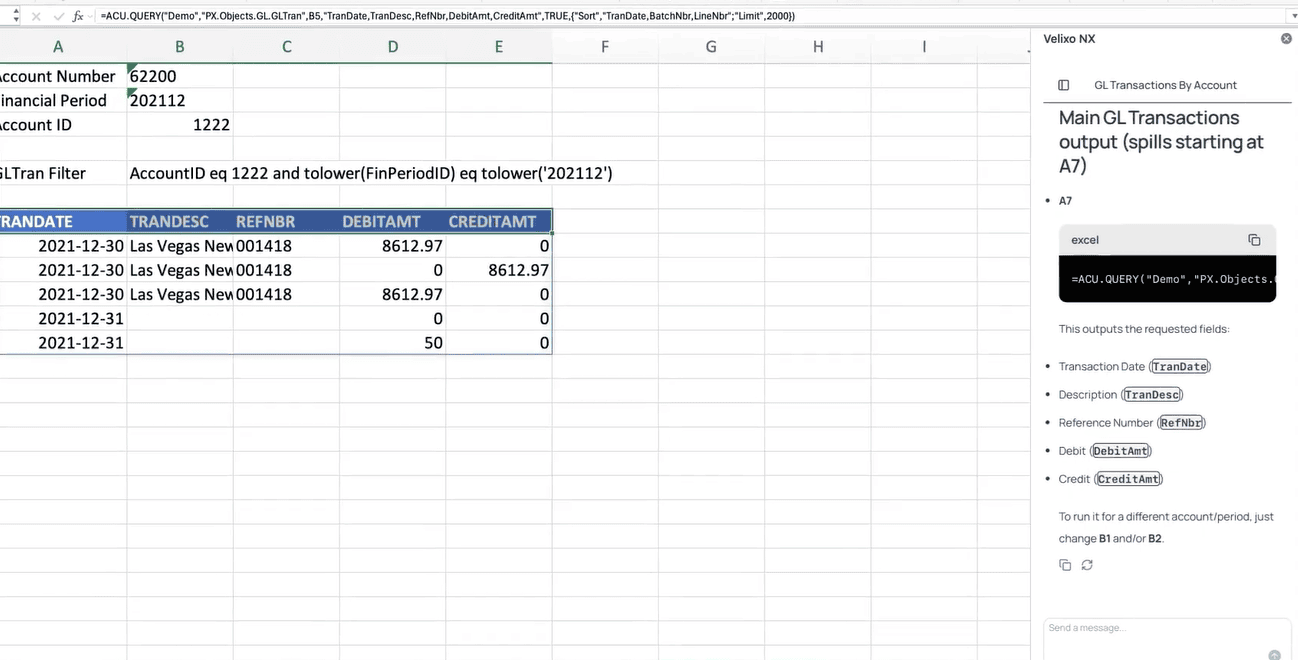
Build me a report that pulls GL transactions for account 62200, period 12-2025
Type the request. The Report Builder writes the Velixo formulas, places the parameters in the cells you’d expect to find them, and pulls the rows. You get a real report you can edit, version, and ship — not a static export, not a one-off answer.
Works for the analyst building from scratch. Works for the consultant inheriting a workbook with 400 formulas and no documentation. The output is a Velixo formula either of them can defend at audit.
Powered by the Report Builder skill.

The commentary lives in the cell. Not the sidebar.
=VX.ASK() writes the explanation in the column next to the number it’s explaining. Refresh the workbook — the commentary refreshes too. Email the file to the board — the commentary travels with it. Send it to audit — the commentary cites the source rows.
Watch VX.ASK() explain a variance
The function competitors can’t write — because their commentary doesn’t live in the workbook.
Stuck on a formula? Ask.
Type the question. Get the answer with the source — the function, the argument, the doc page, the GL field — in the side panel next to your sheet.
- Why is =ACCOUNTENDINGBALANCE(“4000-100”, TODAY()) returning #VALUE!?
- How do I pull AR invoices aged 60+ days, by customer, for the East region?
- What does the Branch argument do in this query, and why does my filter return zero rows?
Need the fix applied, not just explained? Velixo Intelligence can edit the formula for you. You approve. It writes.
Watch a short demo:
Powered by the Guide skill.
What happened this month? Ask.
Highlight any range. Ask what’s in it. The Analyst reads your sheet — your headers, your formulas, your dimensions — and answers grounded in the actual values, with the cells it used cited in the response.
The answer lands in the side panel, in a cell, or as a formula written to the sheet — your call. No data leaves Excel. No screenshots, no copy-paste into a chatbot.
Powered by the Analyst skill.
Build me a report that pulls GL transactions for account 62200, period 12-2025
Type the request. The Report Builder writes the Velixo formulas, places the parameters in the cells you’d expect to find them, and pulls the rows. You get a real report you can edit, version, and ship — not a static export, not a one-off answer.
Works for the analyst building from scratch. Works for the consultant inheriting a workbook with 400 formulas and no documentation. The output is a Velixo formula either of them can defend at audit.
Powered by the Report Builder skill.
The commentary lives in the cell. Not the sidebar.
=VX.ASK() writes the explanation in the column next to the number it’s explaining. Refresh the workbook — the commentary refreshes too. Email the file to the board — the commentary travels with it. Send it to audit — the commentary cites the source rows.
Watch VX.ASK() explain a variance
The function competitors can’t write — because their commentary doesn’t live in the workbook.
Built differently
Live data. Excel surface. Plain English. Real governance.
Live ERP. No cube.
Velixo Intelligence reads from the live general ledger. No data warehouse. No staging layer. No nightly refresh. The number the AI explains is the number on the GL.
Excel is the surface.
Velixo Intelligence lives inside the workbook your team already opens. No separate planning platform. No second tab. The ERP stays the system of record.
One prompt box.
The right agent answers.
You type the question. Guide, Analyst, or Report Builder — orchestrated automatically. You don't choose. You ask.
Commentary in the cell.
=VX.ASK() writes the explanation in the column next to the number it's explaining. Refreshes when the numbers refresh. Travels with the workbook. Cites the source rows.
Opt-out at the org level.
If your organization has policies against sending data to LLMs, turn it off. The rest of Velixo still works.
Built on a decade of doing this right.
3,400 customers in 25 countries. 97% retention. SOC 2 Type II. Momentum Leader on G2 Financial Analysis.