

Your ERP Reporting Workaround Has a Shelf Life: Comparing the Ways Finance Teams Get Data Out of Sage Intacct

Every Controller I’ve spoken with in the last year has some version of the same story: the ERP’s built-in reports don’t do what they need, so they’ve built a system around the system. It closes the books. But it costs more time and depends on more people than anyone wants to admit.
The workarounds tend to fall into three categories. If you run Sage Intacct and Excel, you’ll probably recognize at least one.
The CSV Export: Fast to Start, Expensive to Maintain
This is the most common approach. Sage Intacct can export data. Excel can do anything with it. So every month, someone pulls CSVs, drops them into a workbook, reformats, adds formulas, and delivers the report.
The problem isn’t the first time you build the report. Every month, you’re re-doing the same work. Add a new entity, get a late journal entry, or deal with a restatement, and you’re basically rebuilding your reports.
What this costs you:
The time isn’t just in the export. It’s in the re-export, the version confusion (“Q3 financials_v3_FINAL_updated”), the reconciliation when someone spots a number that doesn’t match. It’s when your team spends the first week of every month on report mechanics instead of analysis.
When this approach makes sense:
One-off analysis. Ad hoc requests that won’t repeat. Anything where the cost of rebuilding is lower than the cost of setting up something better.
The SQL Query or API Script: Powerful but Fragile
Some teams bypass the ERP’s reporting layer entirely. They write SQL queries against the database, build API scripts to pull transaction data, or use middleware to pipe data into a BI tool.
This is technically powerful and it solves the real-time problem. But it creates a different risk.
The dependency problem:
The person who wrote the query is now the person who maintains it. When Intacct updates a field name, when a new dimension gets added, when the query needs to account for a different entity structure, that person is the bottleneck.
The translation problem:
SQL output doesn’t look like a financial report. Someone still has to take that raw data and format it into something a CFO or a board member can read. Which usually means… exporting into Excel.
When this approach makes sense:
Large-scale data pipelines where finance isn’t the only consumer. Companies with dedicated IT or analytics teams who can maintain the queries long-term. If your finance team is writing their own SQL, something has gone wrong in the tooling layer, their time is too expensive for that.
The ERP’s Built-in Reports: Safe but Limiting
Sage Intacct’s native reporting is solid for standard financials. Trial balances, P&L by department, balance sheets, the basics are covered.
The problems start when you need something the report writer wasn’t designed for.
Where it falls short:
Custom layouts. Multi-entity consolidations with eliminations. Variance analysis that compares actuals to budget to forecast in one view. Anything that requires combining financial and operational data. The moment you need formatting control, conditional logic, or a structure the report writer doesn’t support, you’re either fighting the tool or exporting to Excel anyway.
The political cost:
Sticking with native reports feels like the safest choice. No new tools to justify, no learning curve, no budget request. But it means every non-standard request from the CFO, the board, or an auditor becomes a project. “Can you show me this data cut a different way?” takes two days.
When this approach makes sense:
Standardized reporting where Intacct’s default output matches what your stakeholders need. If your CFO and board are happy with the format and you rarely get ad hoc requests, native reports might genuinely be enough. Most teams I talk to crossed that threshold a while ago.
The Tradeoff Nobody Evaluates
Most finance teams have never actually compared these approaches side by side.
But each approach has a clear set of tradeoffs:
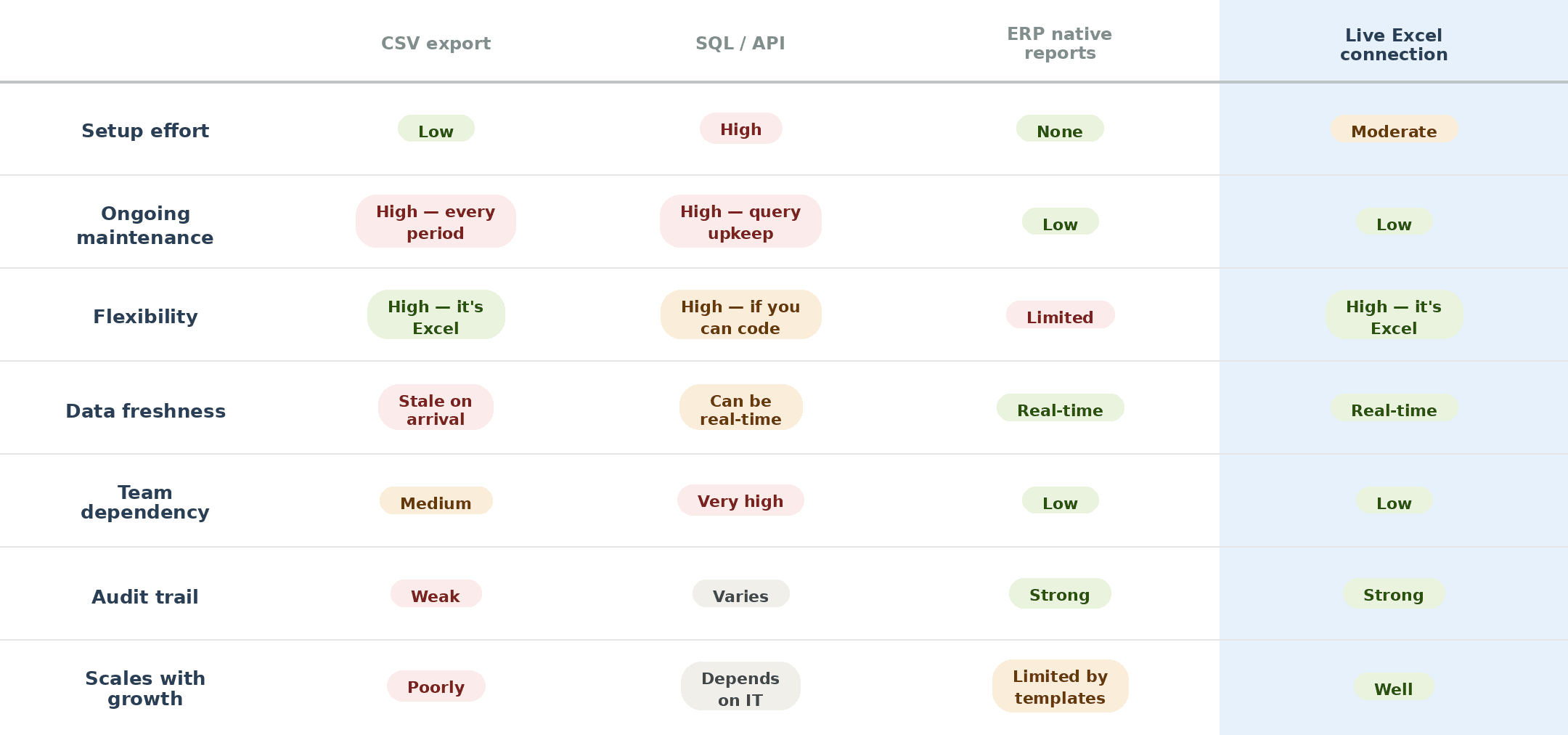
The fourth column is where Velixo sits. It’s a live, bi-directional connection between Excel and Sage Intacct. Data pulls into Excel in real time, no export, no upload, no stale CSV. And data pushes back: estimates, budgets, journal entries, directly from Excel into Intacct.
The reason it’s worth including in this comparison isn’t because it’s our product. It’s because it eliminates the core tradeoff the other three approaches force you to make: you no longer have to choose between the flexibility of Excel and the reliability of live ERP data.
Where to Go From Here
If you recognized your team in one of these sections, you’re not behind. Every finance team started from here.
The question isn’t whether your workaround works today. It’s whether it’ll still work in twelve months when you’ve added complexity, headcount expectations haven’t changed, and the CFO wants reporting that looks like it came from a company twice your size.