

Excel as a Platform: How Modern Finance Teams Should Actually Evaluate It


Excel as a platform is still widely misunderstood in modern finance.
For years, I misunderstood it myself. I treated Excel as a signal of immaturity rather than a reflection of how finance teams actually work. ERPs represented progress. Excel felt transitional.
That framing was comfortable. It also prevented a more useful evaluation. Instead of looking at how Excel was being used, I treated the tool itself as the problem.
The reality is that Excel has continued to evolve alongside finance work. As reporting cycles compressed and questions became less predictable, teams needed a place to work through numbers, test assumptions, and explain outcomes. Excel became that space, even as systems of record expanded and specialized tools multiplied.
The gap comes from applying outdated assumptions to a tool that has continued to change. Evaluating Excel based on current workflows produces a different assessment than evaluating it based on past limitations.
Excel as a Platform vs Excel as a Database
Excel shouldn’t be used as a database.
That statement isn’t controversial among finance and systems professionals, but it often gets lost when broader critiques of Excel are made. Excel wasn’t designed to function as a system of record. It doesn’t enforce referential integrity, manage concurrent writes at scale, or provide the controls required for transactional storage.
Most finance teams understand this. Confusion usually appears when Excel is evaluated without distinguishing what role it’s playing in the broader architecture.
In practice, Excel is often used downstream of authoritative systems. Data originates in an ERP or operational platform, then gets accessed through live connections, transformed in repeatable ways, and analyzed within Excel. In that context, Excel isn’t replacing a database. It’s providing a working surface for validation, modeling, and explanation.
Problems emerge when Excel is asked to take ownership of data rather than interact with it. That includes manual data entry replacing integration, flat files becoming the only source of truth, or business logic living exclusively inside ungoverned workbooks.
Those issues are architectural, not inherent to Excel itself. They reflect decisions about data ownership, integration, and control.
Evaluating Excel as a platform requires separating those concerns. Used as an interface connected to systems of record, Excel supports finance work that’s iterative, review-oriented, and explanation-driven. Used as storage, it predictably fails at responsibilities it was never designed to carry.
What Changed In Excel Over Time
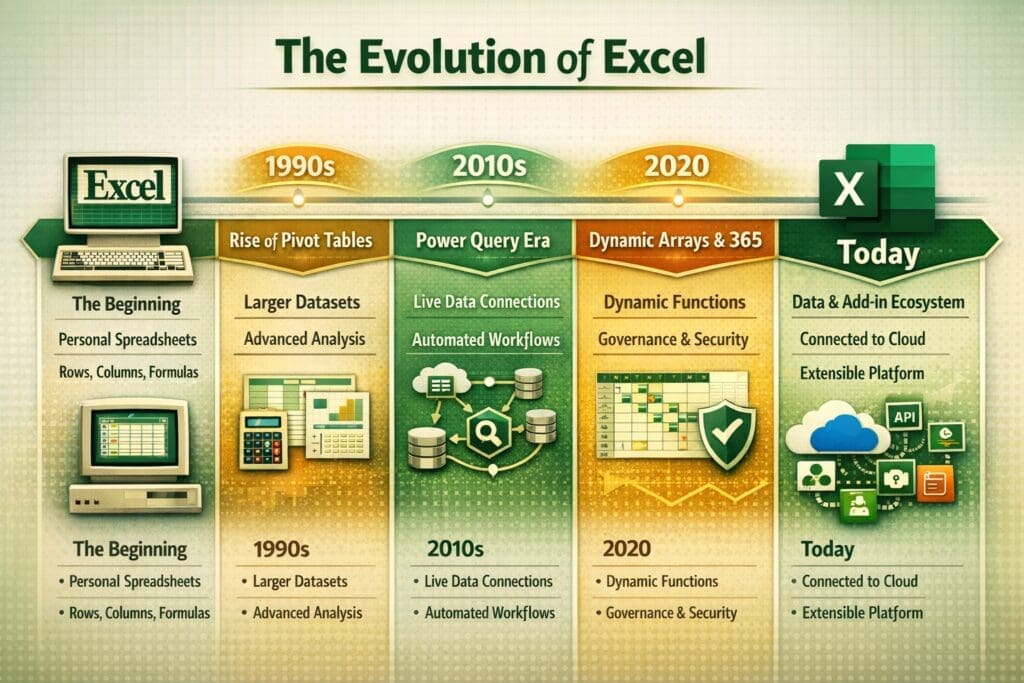
Excel launched in 1985 as a personal productivity tool built around rows, columns, and formulas. It was local, static, and designed for individual use.
As organizations grew, finance work became less predictable. ERPs handled transactional integrity, but they didn’t eliminate the need for a place to validate results, reconcile differences, and explain outcomes to stakeholders who weren’t living in the general ledger. Excel increasingly filled that role.
Over time, Excel adapted to support that kind of work. Pivot tables made it possible to explore larger datasets without rebuilding reports. Power Query shifted data preparation from one-off exports to repeatable, documented transformations. Live connections reduced reliance on static snapshots. Dynamic arrays simplified model structures and reduced hidden logic. Microsoft 365 added version history, permissions, protected ranges, and shared access.
Taken together, those changes altered how Excel functioned inside finance teams. It moved from being a file passed between people to a managed workspace that could sit on top of authoritative systems and support repeatable workflows.
As a result, Excel now operates inside many finance teams as a working layer connected to, not separate from, core systems.
Excel in Modern Finance Teams
In modern finance teams, Excel operates as a working environment layered on top of systems of record. ERPs handle transactional integrity, enforce controls, and maintain audit trails. Excel is where finance professionals interact with that data once it exists.
Controllers use Excel to reconcile subledgers, validate allocations, and review detailed activity across periods. Accounting Managers use it to test assumptions, review supporting detail, and work through variances before explanations are finalized. These tasks often involve questions that weren’t known when a standard report was designed.
These workflows depend on connection, not ownership. Excel doesn’t need to store data to support this work. It needs to stay aligned with authoritative systems as analysis is performed.
Live connections allow workbooks to refresh without rebuilding logic. Power Query enables repeatable transformations that can be reviewed and maintained over time. Permissions, protected ranges, and version history reduce the risk of unintended changes while supporting collaboration. Together, these capabilities allow Excel to function as a governed workspace rather than an isolated file.
Within this structure, Excel supports iterative review and explanation without becoming a source of record. It provides transparency into how conclusions are formed while leaving data ownership with the systems designed to manage it.
Why Vendors Build on Excel as a Platform
Excel already sits inside finance workflows as a working layer where analysis, validation, and review take place.
For many finance teams, it’s where data is examined before it’s finalized, where adjustments are reviewed, and where explanations are prepared for auditors, leadership, and external stakeholders. Vendors that build on Excel align with that reality rather than trying to redirect those workflows into a separate interface.
This approach depends on Excel functioning as a stable, governable environment. Add-ins rely on consistent calculation behavior, managed permissions, version history, and shared access through Microsoft 365. Live connections and refresh controls allow direct integration with systems of record without duplicating data or weakening controls.
Velixo follows this pattern by using Excel as an interface while keeping data ownership in systems like Sage Intacct, Microsoft Dynamics 365 Business Central, or Acumatica. Financial data is pulled live, transformed in controlled ways, and presented in a format finance teams already use to review and validate results. Writeback workflows preserve auditability by enforcing rules at the system level rather than inside the workbook.
This structure reduces friction in day-to-day finance work. Teams retain flexibility without giving up control, and vendors don’t have to recreate an analysis environment that already exists. Excel provides the surface, while underlying systems retain responsibility for data integrity.
Why Excel as a Platform Is Still Dismissed
Despite how widely Excel is used in modern finance workflows, it’s still often dismissed as outdated or inappropriate for serious work. That perception is largely shaped by how Excel was used in earlier stages of system maturity.
In many organizations, Excel filled gaps left by missing or incomplete systems. Critical data lived in unmanaged files, information was rekeyed manually, and business logic existed only inside individual workbooks. Those practices created real risk and left lasting impressions for both practitioners and vendors.
What often goes unexamined is whether those outcomes were caused by Excel itself or by the absence of proper system architecture. When Excel was asked to function as a system of record, it predictably failed at responsibilities it wasn’t designed to carry. The failures reflected architectural decisions rather than inherent limitations of the tool.
As finance systems matured, Excel’s role inside those environments changed as well. Live integrations reduced reliance on manual data movement. Governance features addressed many of the control gaps that once defined spreadsheet risk. Add-ins introduced structure and auditability that didn’t exist when those earlier patterns were formed.
Vendor messaging and buyer assumptions didn’t evolve at the same pace. Positioning Excel as a liability simplifies a sales narrative, and rejecting it outright can feel like a shortcut to modernization. Both approaches avoid a more nuanced evaluation of how finance work actually happens and where flexibility is still required.
As a result, Excel is often judged based on how it behaved when it was compensating for missing systems rather than how it functions today as part of a connected finance stack.
How to Evaluate Excel as a Platform Today
Evaluating Excel as a platform starts with clarifying the role it plays inside the finance architecture. Excel shouldn’t be assessed as a system of record or compared directly to an ERP. It should be evaluated based on how effectively it supports analysis, validation, and explanation while remaining connected to authoritative systems.
In a well-designed environment, data originates in systems built to store and control it. Excel connects to that data through live integrations rather than exports. Transformations are repeatable and visible. Refresh behavior is predictable. Logic can be reviewed and understood by someone other than the original author.
Governance matters at this layer. Permissions, protected ranges, and version history reduce the risk of unintended changes while still allowing collaboration. Shared access replaces file passing. When writeback is required, controls are enforced by the underlying system rather than embedded in formulas.
Excel also needs to support change. Finance questions evolve faster than reporting structures, and teams need the ability to adjust logic without rebuilding entire workflows. Dynamic arrays, structured references, and add-in frameworks allow models to adapt while remaining inspectable.
When Excel is used this way, it becomes easier to separate healthy usage from risky patterns. Risk appears when Excel owns data, hides logic, or replaces integration. Value appears when Excel stays connected, transparent, and governed.
Evaluated on those criteria, Excel functions as a practical interface layer rather than a liability. It supports how finance teams actually work without compromising control or auditability.