




Velixo Intelligence
AI that works where your finance work actually happens: inside Excel
Velixo Intelligence brings purpose-built AI directly into Excel - right alongside and inside your Velixo reports, models, and financial analysis. No context switching. No exporting data. Just powerful AI assistance living inside your workbooks.

Built for Finance, ERP, and Excel Users
Velixo Intelligence introduces case-focused AI Assistants that deeply understand:
- Velixo formulas and reports
- Your ERP (technical and functional concepts)
- Financial reporting and analysis best practices
- How Excel users actually work, analyze, and decide
The result? AI that helps you do your job, not just talk about it.
Specialized AI Agents, One Seamless Experience
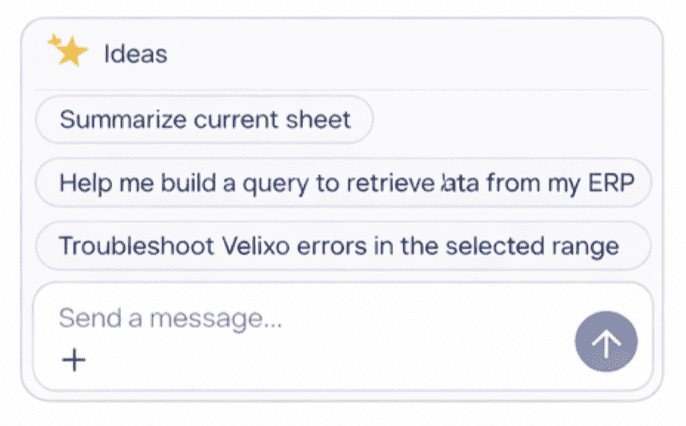
Seamlessly integrated into one unique experience, Velixo Intelligence redirects you to the best agent for the task.
Your personal Velixo & ERP expert
Get instant answers to any technical or functional question related to:
- Velixo formulas, features, and best practices
- ERP concepts and data structures
- How to build, optimize, or troubleshoot reports
The Guide Agent can even make changes for you, helping you move from question to solution faster than ever.
Finance-level analysis, on demand
Turn your reports into insights. The Analyst Agent deeply analyzes your Velixo report data to:
- Generate executive-ready summaries
- Identify anomalies, trends, and outliers
- Compare performance across periods or entities
- Enrich analysis with external data
- Surface insights a Finance Business Analyst would normally produce
All without leaving Excel – and always grounded in your actual report data.
From idea to report – automatically.
Need a new formula? A new report? A faster way to get there? The Builder Agent can:
- Create new Velixo formulas
- Assemble complete Velixo reports
- Adapt reports to new business requirements
- Accelerate report development for both power users and newcomers
It’s like having a Velixo expert sitting next to you, building with you.

Context Menu Actions
Velixo’s context menus give you instant, in-sheet intelligence.
- Use Summarize to generate clear summaries or notes for a selected cell range, powered by the Analyst Agent.
- When you need help, Troubleshoot taps into the Guide Agent to search Velixo’s documentation and surface relevant answers – right where you’re working.
Velixo Intelligence also introduces a new AI function you can insert anywhere in your workbook.
Use it to generate:
- Dynamic report notes
- Management summaries
- Variance explanations
- Contextual narratives that update as data change
Perfect for side-by-side commentary, board-ready reporting, and storytelling that stays in sync with your numbers.
Your personal Velixo & ERP expert
Get instant answers to any technical or functional question related to:
- Velixo formulas, features, and best practices
- ERP concepts and data structures
- How to build, optimize, or troubleshoot reports
The Guide Agent can even make changes for you, helping you move from question to solution faster than ever.
Finance-level analysis, on demand
Turn your reports into insights. The Analyst Agent deeply analyzes your Velixo report data to:
- Generate executive-ready summaries
- Identify anomalies, trends, and outliers
- Compare performance across periods or entities
- Enrich analysis with external data
- Surface insights a Finance Business Analyst would normally produce
All without leaving Excel – and always grounded in your actual report data.
From idea to report – automatically.
Need a new formula? A new report? A faster way to get there? The Builder Agent can:
- Create new Velixo formulas
- Assemble complete Velixo reports
- Adapt reports to new business requirements
- Accelerate report development for both power users and newcomers
It’s like having a Velixo expert sitting next to you, building with you.
Context Menu Actions
Velixo’s context menus give you instant, in-sheet intelligence.
- Use Summarize to generate clear summaries or notes for a selected cell range, powered by the Analyst Agent.
- When you need help, Troubleshoot taps into the Guide Agent to search Velixo’s documentation and surface relevant answers – right where you’re working.
Velixo Intelligence also introduces a new AI function you can insert anywhere in your workbook.
Use it to generate:
- Dynamic report notes
- Management summaries
- Variance explanations
- Contextual narratives that update as data change
Perfect for side-by-side commentary, board-ready reporting, and storytelling that stays in sync with your numbers.
Why Velixo Intelligence Is Different
AI that respects how professionals actually work.
Lives inside Excel
No separate AI tools or interfaces
Understands your ERP and reports
Not just pre-made text prompts
Designed for Finance & ERP teams
Not generic use cases
Actionable, not theoretical
helps you build, analyze, and decide
Built & Optimized for Velixo
Not generic AI, AI that deeply understands Velixo
One of Our Biggest Innovations Ever
Velixo Intelligence represents a major milestone for Velixo – and for ERP reporting in Excel.
It brings together:
- AI
- ERP knowledge excellence
- Financial intelligence
- Excel expertise
- Deep Velixo knowledge
All in one seamless experience! And Velixo is just getting started.